




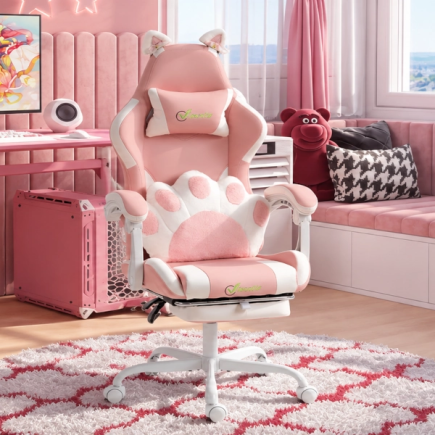

















The HOMCOM Cute Gamer Chair (SKU: 921-794V00BK) is a racing-style ergonomic chair designed for indoor use. It features adjustable seat height, padded armrests, removable lumbar and headrest pillows, a retractable footrest integrated into the seat, and decorative cat ears. Follow the instructions below for safe and proper assembly.
Estimated Assembly Time: Approx. 30 minutes
Recommended People: 1–2 adults
Parts and Hardware List
Parts List
| Part ID | Quantity | Part Name |
| A | 5 | Casters |
| B | 1 | Five-Star Base |
| C | 1 | Gas Lift |
| D | 1 | Gas Lift Cover |
| E | 1 | Seat Mechanism |
| F | 1 | Seat Cushion |
| G | 1 | Backrest |
| H | 2 | Armrests |
| J | 1 | Backrest Support Plate |
| K | 1 | Lumbar Pillow |
| L | 1 | Headrest Pillow |
| M | 1 | Decorative Cat Ear Set |
Hardware List
| Hardware ID | Quantity | Specification |
| a | 4 | M6 × 20mm Bolts |
| b | 4 | M6 × 25mm Bolts |
| c | 4 | M8 × 20mm Bolts |
| d | 4 | M8 × 40mm Bolts |
| e | 4 | Plastic Covers |
| f | 1 | Allen Key |
Safety Instructions
- Indoor use only.
- Maximum weight capacity: 120 kg.
- Assemble on a flat, stable surface.
- Ensure all bolts are fully tightened before use.
- Do not stand on the chair.
- Do not use it as a ladder.
- Keep fingers clear when adjusting the backrest or height.
Assembly Instructions
When assembling your HOMCOM Cute Gamer Chair, please follow these steps carefully to ensure a smooth and easy assembly process.
Step 1: Install Casters and Gas Lift
Parts Used:
- A: Casters (x5)
- B: Five-Star Base
- C: Gas Lift
- D: Gas Lift Cover
Instructions:
- Place the Five-Star Base (B) upside down on a flat surface.
- Insert all five Casters (A) firmly into the designated holes on the base. Push until each caster is fully seated.
- Turn the base upright.
- Insert the Gas Lift (C) vertically into the center opening of the Five-Star Base (B).
- Slide the Gas Lift Cover (D) over the Gas Lift (C) until it rests securely in place.
Step 2: Attach Seat Mechanism to Seat Cushion
Parts Used:
- F: Seat Cushion
- E: Seat Mechanism
- a: M6 × 20mm Bolts (x4)
- f: Allen Key
Instructions:
- Place the Seat Cushion (F) upside down on a clean, soft surface to prevent damage.
- Position the Seat Mechanism (E) onto the bottom of the Seat Cushion (F), aligning the mounting holes correctly.
- Insert four M6 × 20mm Bolts (a) through the mechanism into the seat frame.
- Tighten the bolts evenly using the Allen Key (f).
- Ensure the Seat Mechanism (E) is securely fastened and properly aligned before proceeding to the next step.
Step 3: Install Seat Assembly onto Base
Parts Used:
- F: Seat Cushion (with Seat Mechanism attached)
- B: Five-Star Base
- C: Gas Lift
- D: Gas Lift Cover
Instructions:
- Lift the assembled Seat Cushion (F) carefully.
- Align the center opening of the Seat Mechanism with the top of the Gas Lift (C).
- Lower the Seat Cushion (F) vertically onto the Gas Lift (C).
- Press down gently to ensure the connection is properly seated.
Step 4: Attach Backrest Support Plate
Parts Used:
- G: Backrest
- J: Backrest Support Plate
- b: M6 × 25mm Bolts (x4)
- f: Allen Key
Instructions:
- Place the Backrest (G) face down on a soft surface to prevent damage.
- Position the Backrest Support Plate (J) onto the designated mounting area of the Backrest (G).
- Align the holes of the Backrest Support Plate (J) with the threaded inserts on the Backrest (G).
- Insert four M6 × 25mm Bolts (b) through the plate into the backrest
- Tighten the bolts evenly using the Allen Key (f) until securely fastened.
Step 5: Attach Backrest to Seat Assembly
Parts Used:
- G: Backrest (with Backrest Support Plate attached)
- c: M8 × 20mm Bolts (x4)
- f: Allen Key
Instructions:
- Lift the Backrest (G) and align the Backrest Support Plate with the mounting bracket on the Seat Mechanism.
- Carefully lower the Backrest into position, ensuring the holes align correctly.
- Insert four M8 × 20mm Bolts (c) through the mounting holes.
- Tighten the bolts evenly using the Allen Key (f).
- Ensure the Backrest is securely attached and properly aligned before proceeding.
Step 6: Install Armrests
Parts Used:
- H: Armrests (x2)
- d: M8 × 40mm Bolts (x4)
- e: Plastic Covers (x4)
- f: Allen Key
Instructions:
- Position the Armrests (H) on both sides of the seat and backrest assembly.
- Align the mounting holes of each armrest with the threaded holes on the seat structure.
- Insert four M8 × 40mm Bolts (d) through the armrest brackets.
- Tighten the bolts evenly using the Allen Key (f).
- After tightening, press the Plastic Covers (e) onto the exposed bolt heads to conceal them.
- Ensure both armrests are securely fixed and aligned properly before proceeding.
Step 7: Attach Headrest and Lumbar Pillows
Parts Used:
- L: Headrest Pillow
- K: Lumbar Pillow
Instructions:
- Position the Headrest Pillow (L) at the top section of the Backrest.
- Insert the elastic strap of the Headrest Pillow (L) through the upper openings of the backrest and secure it at the rear.
- Place the Lumbar Pillow (K) against the lower back area of the backrest.
- Guide the elastic strap of the Lumbar Pillow (K) through the designated openings and secure it firmly at the back.
- Adjust both pillows to achieve the desired support and comfort level.
Step 8: Install Decorative Cat Ear Set
Parts Used:
- M: Decorative Cat Ear Set
Instructions:
- Position the Decorative Cat Ear Set (M) at the top of the backrest as shown in the diagram.
- Align the cat ears evenly on both sides of the backrest.
- Press the Decorative Cat Ear Set (M) firmly into place until securely attached.
- Check that the cat ears are stable and properly positioned.
Completed Chair
After tightening all bolts and confirming stability, the chair is fully assembled.Adjust seat height using the lever beneath the seat. Extend the footrest by pulling it forward when needed, and slide it back when not in use. Your HOMCOM Cute Gamer Chair (SKU: 921-794V00BK) is now ready for use.
Usage Tips
- Always use a level surface.
- Recheck bolt tightness after initial use.
- Adjust height while seated.
- Slide the footrest gently to avoid strain on the mechanism.
Care & Maintenance
- Wipe faux leather with a soft damp cloth.
- Avoid harsh chemicals and abrasive cleaners.
- Keep away from direct sunlight.
- Periodically check and tighten bolts.
You can also download the official HOMCOM Farmhouse Coffee Table assembly manual(PDF) for reference.
For technical support, replacement parts, or product questions,contact Aosom LLC’s Customer Service and get friendly assistance.
FAQs
Ensure the reclining tension knob under the seat is not overly tightened, as this restricts movement. Check that the M8 × 20mm bolts connecting the backrest are secure but not overtightened. Lightly adjust tension gradually until smooth recline motion is achieved.
Recheck the M8 × 40mm bolts after the first few days of use since vibration can reduce tightness. Use steady, even pressure when tightening rather than forcing one side fully first. Periodic inspection every few months helps prevent long-term structural stress.
Make sure the chair is on a flat surface so the frame is not under twisting pressure. Pull the footrest straight outward instead of at an angle to avoid rail misalignment. If stiffness continues, inspect the sliding rails for debris and wipe them clean gently.