



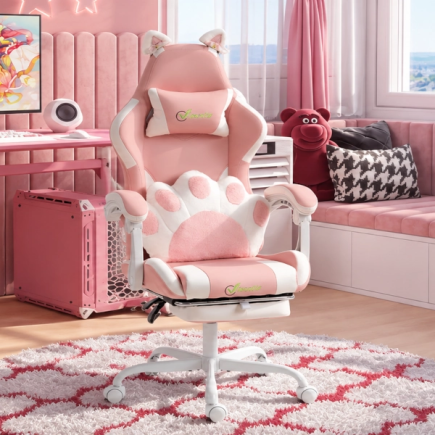

















The best gaming chair is the one that fits your body, supports your back and still feels comfortable hours into a session. Looks come second. Here’s what to check before you buy, from fit and support to materials that hold up through a Canadian winter and a sticky summer.
Start With How You Actually Sit and Play
The right chair for a weekend console player isn’t the same as the right chair for someone who works from home and games every night. Think about your habits before you compare models.
- Hours per day: If you sit for more than three or four hours a day, support and adjustability come first.
- Gaming style: Competitive shooters keep you upright and leaning in, while story games and streaming often have you leaning back.
- Work and play: If the chair doubles as your home office seat, it needs to handle full workdays too.
Racing Style or Ergonomic, Which Way to Go?
Racing-style chairs are the classic gaming look, with a high back, contoured side wings and bold colour accents. They hold you in place during intense matches and give your setup that esports feel. If you like to shift around or sit cross-legged, check that the seat is wide enough and the side bolsters are padded rather than stiff.
Ergonomic-style gaming chairs use flatter seats and office-inspired shapes, which suit long workdays as well as gaming. Pick the one that matches how you sit, then make sure it delivers on the fundamentals below. Extras like RGB lighting, a retractable footrest or massage lumbar are great bonuses when the basics are solid.
Get the Size and Fit Right First
Fit is the most important factor, and the one most people skip. A chair built for someone 15 cm taller than you will never feel right, no matter how many adjustments it has. Treat the brand’s recommended height and weight range as a real guide.
- Height: Your feet should rest flat on the floor with your knees at roughly 90 degrees. Shorter gamers may need a lower minimum seat height or a footrest.
- Seat depth: Sitting all the way back, you should fit two or three fingers between the seat edge and the back of your knees. A rounded “waterfall” front edge also eases pressure behind the knees.
- Weight capacity: Stay comfortably under the listed limit. Bigger players should look at XL or big-and-tall models with wider seats and stronger frames.
- Backrest height: The backrest should reach at least your shoulder blades so your whole back stays supported.
Don’t Compromise on Lumbar Support
Good lumbar support keeps the natural curve of your lower back. Without it, you slouch, and your neck and shoulders pay for it.
- Removable lumbar pillows: Easy to reposition, and best with firm, high-density fill.
- Built-in adjustable lumbar: A panel inside the backrest you can move up, down or in.
- Dynamic lumbar: Flexes with you as you lean, so support follows your movement.
When shopping online, check the product photos and description to see where the support sits and how it adjusts. If you’re shorter or taller than average, adjustable support matters even more, since fixed lumbar is shaped for an average back.
Neck support matters too. A height-adjustable headrest or neck pillow should cradle the base of your skull when you lean back, without pushing your head forward when you sit upright.
Focus on Adjustments That Actually Matter
More adjustments only help if they’re the right ones and they lock firmly in place.
| Adjustment | What to look for | Why it matters |
| Seat height | A wide range of travel | Lets you match almost any desk |
| Armrests | 3D or 4D movement | Lines up with your desk and takes strain off your shoulders |
| Recline | Upright to a deep recline, with a solid lock | Sit tall for gameplay, lean back between matches |
| Tilt | Tension knob and tilt lock | Gentle rocking without feeling unstable |
| Footrest (optional) | Retractable and sturdy | Lets you stretch out during breaks and cutscenes |
4D armrests make a real difference if you use a keyboard and mouse daily, since you can angle them inward and slide them closer to the desk. Also make sure the controls are easy to reach while seated.
Pick Upholstery That Handles Canadian Seasons
Canada throws a bit of everything at your chair, from dry furnace air in winter to humid summers in Toronto or Montreal.
| Material | Pros | Cons |
| PU leather | Sleek look, wipes clean easily | Traps heat, cheaper PU can crack or peel in dry winter air |
| Fabric | Soft, breathable, cozy in colder months | Can absorb spills and pet hair |
| Mesh | Best airflow for hot rooms | Cheap mesh can sag over time |
| Hybrid | Cool mesh back with a cushioned seat | Fewer options on budget models |
If you choose leather, keep the chair away from heat vents and baseboard heaters. Under the cover, look for high-density or cold-cured foam, since soft foam flattens within months.
Check the Frame, Base and Casters
The parts you can’t see decide whether your chair lasts two years or ten. Look for a solid steel frame rather than plastic, which can flex or crack, and a warranty that covers the frame and mechanism.
- Base: A five-point base is a must. Aluminium and steel are the sturdiest, while reinforced nylon works well on many mid-range chairs.
- Gas lift: A Class 4 cylinder handles more weight and generally lasts longer.
- Casters: Larger PU-coated wheels roll quietly and are gentler on hardwood and laminate, which are common in Canadian homes. A chair mat protects your floors and catches the salt and grit tracked in during winter.
Think About Your Space, Desk and Assembly
Gaming chairs tend to be bulky, which matters in a downtown condo, a shared apartment or a corner of the basement. Measure your space first and leave room to swivel and recline without hitting a wall.
- Space-saving features: Flip-up armrests let you tuck the chair fully under your desk when you’re done, freeing up floor space. A more compact frame is also worth considering for small rooms.
- Desk pairing: With your feet flat and elbows at about 90 degrees, your forearms should rest comfortably on the desk. Check that the armrests can slide under the desk so you can pull in close.
- Assembly: Most chairs ship in a box and take under an hour to put together, with tools included. A second set of hands makes lining up the backrest much easier.
Set a Realistic Budget
A great gaming chair doesn’t have to cost a fortune. Set a limit you’re comfortable with and compare chairs within it using the checklist below.
- Check the final price: Look at the total with taxes and delivery before you compare chairs.
- Shop Canadian: Buying from a Canadian retailer like Aosom Canada means prices in CAD and no surprise duties or brokerage fees.
- Read real reviews: Owner reviews that talk about comfort after a few months tell you more than first impressions.
- Watch for sales: Boxing Day and Black Friday are great times to upgrade for less.
Quick Buying Checklist
Run through this list before you check out.
- The height and weight range matches my body
- My feet sit flat and the seat depth suits my legs
- Lumbar support sits right where my back curves
- The headrest lines up with my neck
- Armrests are at least 3D, ideally 4D
- Recline locks firmly and tilt tension is adjustable
- Upholstery suits my room temperature
- Steel frame, five-point base and Class 4 gas lift
- Casters suit my floor, or I’ve planned for a chair mat
- It fits my room and works with my desk
Your Back Will Thank You Long After the Final Boss
You’ll likely spend more hours in your chair than with any other piece of gear in your setup, so it’s worth getting right. Let fit and support lead the decision, and treat the extras as a bonus rather than the reason you buy. Get it right once and you’ll feel the difference every session, from the first match of the night to the last. Happy gaming!
Ready to upgrade your setup? Explore the full range of gaming chairs at Aosom Canada and find the one that fits your body, your space and your style.
FAQs
Yes, as long as the chair fits their size. Many standard gaming chairs are built for adults, so check the minimum seat height and seat depth. A smaller frame or a footrest helps teens sit with good posture while they grow.
2D armrests move up, down and rotate. 3D armrests add forward and back sliding, while 4D armrests also shift side to side. More movement lets you line the armrests up with your desk, keyboard and mouse for a relaxed shoulder position.
Often, yes. Casters, gas lifts and lumbar pillows use fairly standard sizes on many chairs, so you can swap a worn part instead of buying a new chair. Check the model’s specs or contact the retailer to find the right replacement part.
It can be. Console players sit farther from the screen and lean back more, so a chair with a deep recline, solid headrest and footrest often feels better than a sofa. It also gives you proper back support during long gaming nights.